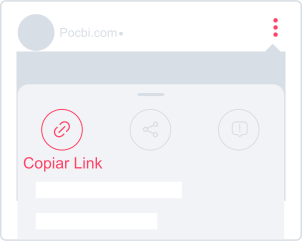
1. Copy the video link
On the Instagram post you want to download, tap the Share icon and choose Copy link.
Save Reels, Stories, photos, and carousels from Instagram
If you need to download an inspiring Reel, a Story before it disappears, or a photo carousel to use offline, Pocbi is the ideal solution without having to install anything on your phone or computer.
With Pocbi, you can download any Instagram video in Full HD in just a few seconds: simply copy the link, with no signup, no watermark, and 100% free.
On the Instagram post you want to download, tap the Share icon and choose Copy link.
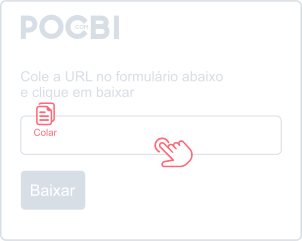
Open Pocbi.com and tap the Paste button in the form above. In a few seconds, the video information will load.
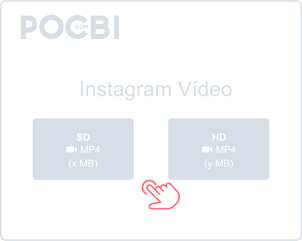
Choose whether you want to download the video or the cover image and tap Download. In seconds, the file is saved to the Downloads folder on your phone or computer.
Pocbi is a 100% online tool created for anyone looking for the fastest and safest way to save Instagram videos. You do not need to install any app on your phone or any mandatory extension in your browser. Just open pocbi.com and download your favorite videos with a simple and intuitive experience, without creating an account.
Reels have become one of the most popular and most watched formats today. If you found an interesting video, a useful tip, or something funny that you want to keep for later, Pocbi can help. Save your favorite Reels in Full HD with full audio and build your offline collection without complications.
Sometimes we need to save an important memory or a reference photo that a friend or profile posted, but Instagram does not offer a native way to download photos. We help with that too. In just a few steps, you can download individual photos or save full Instagram carousels directly to your phone or computer while preserving the original image quality.
Do not miss any temporary content. You can download Instagram Stories from public profiles in a simple and quick way before they disappear after the platform's standard 24 hours.
Pocbi is compatible with any device, whether it is a smartphone (Android or iPhone), a tablet, or a computer (Windows or Mac). Because it is browser-based, you do not have to deal with installation steps or fill up your device storage with new apps.
The site offers unlimited downloads with a simple and intuitive experience. It is one of the most efficient ways to organize your gallery and make sure your favorite Instagram content stays available for offline access whenever you want.
Keep your favorite content while preserving the fidelity, sharpness, and clean look of the original file. Pocbi delivers the media exactly as the creator published it, with no logo, marking, or extra visual element added over the image.
Following user requests, we added the option to download multiple videos at once. No more wasting time waiting for one download to finish before starting the next.
Besides downloading Instagram videos, you can also extract and copy the full caption text. This feature is perfect for anyone who likes to save recipes, tutorials, or travel plans: you keep the video in your gallery and also save the step-by-step text or ingredient list for later.
Although Pocbi works 100% online directly on the site without installing anything, we also created an exclusive convenience for people who use the computer a lot. With our official Google Chrome extension, you get a one-click way to download Instagram content directly from your timeline. It combines the lightness of the site with the convenience of one click on desktop.
Chrome ExtensionBesides Instagram, Pocbi also lets you download content from other public social platforms using the same simple experience.
In the Instagram app, find the video or Reel you want to download, tap Share below the post, and choose Copy link. Then open your browser, go to pocbi.com, paste the link into the field, and tap Download. The file will be saved automatically to your phone gallery.
Open Instagram in the browser, open the post you want, and copy the link by tapping Share below the post or directly from the address bar. For Stories, open the story and copy the URL from the address bar. Then go to pocbi.com, paste the link, and click Download. The video will be saved to your Downloads folder.
To download a Reel, open the Reel on Instagram, tap Share, and choose Copy link. Go to Pocbi, paste the link, and click Download. You can choose the available video quality before confirming the download.
Instagram Stories disappear after 24 hours, but you can save them easily. Open the Story you want to download, copy the link from the browser address bar on desktop or tap Share and choose Copy link on mobile. Paste the link into Pocbi and click Download.
For single photos or carousels with multiple images, copy the post link by tapping Share and paste it into Pocbi. The tool processes all carousel files at once, allowing you to download every photo from the post in one flow.
Yes. All videos, Reels, and Stories downloaded through Pocbi keep the original audio, including music and narration that are part of the content.
After the download is finished, the file is saved automatically to the Downloads folder on your phone or computer. On mobile, it also appears in the photo and video gallery. If you want to change the destination folder, adjust the default download location in your browser settings.
Yes. Pocbi is 100% free and has no download limit. You do not need to create an account, pay for a subscription, or install anything. Reels, Stories, photos, carousels, and other supported social networks are available at no cost.
After the download, open the file in the Downloads folder or in your phone gallery. Tap the video, choose Share, and select WhatsApp. Then choose the contact or group and send it. The same process works for any messaging app.
Yes, as long as the use is personal and non-commercial. You may save Instagram videos to watch offline, keep memories, or analyze reference content. What is not allowed is reposting, selling, or distributing the videos as if they were yours without permission from the original author. Pocbi was created only to make it easier to download public content within legal limits and Instagram guidelines.