
1. Copy the video link
On the right side of the video in TikTok, there is a Share button. Just tap it and choose Copy link.
No watermark
If you need to download a TikTok video, we will help you. Just follow the steps below.
On the right side of the video in TikTok, there is a Share button. Just tap it and choose Copy link.
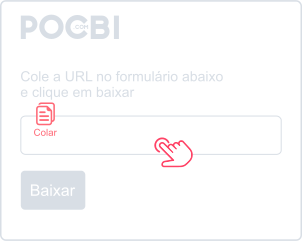
With the link copied, press for one second or right-click on the form above and choose Paste.
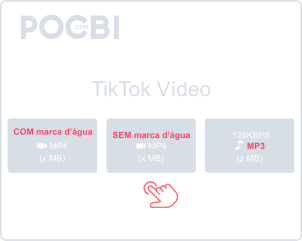
Now just choose whether you want to download the video with watermark, without watermark, or as MP3 and wait for the file to become ready.
Do not let that viral content or amazing trend from TikTok slip away. If you found a video that inspired you, entertained you, or taught you something new, Pocbi is the ideal tool to turn your browsing into a saved library.
We are the ideal solution for anyone looking to download TikTok videos without a watermark, completely free, with no limits, and in the highest quality available.
Whether you are using your smartphone (Android or iPhone) or your computer (Windows or Mac), Pocbi gives you unrestricted access to your favorite content. Our tool is fully web-based, which means you do not need to go through complicated installation steps.
If you want a quick way to download TikTok videos without a watermark, our platform was designed to be simple: just copy the link and paste it.
Download TikTok videos without a watermark and in high quality. Access content from the main social networks in one place, with the speed and simplicity you are looking for.
To download TikTok videos on your phone, whether Android or iPhone, just copy the video link. While watching the video you want to save, tap the Share option on the right side and choose Copy link. Then open your browser and go to pocbi.com. On the site, paste the link into the form at the top, tap Download, and choose whether you want the video with watermark, without watermark, or in MP3. In a few seconds, the file will be saved on your phone.
To download any TikTok video and content from other social networks without installing an app on your phone, just access Pocbi.com using your mobile browser.
If you are using TikTok on your PC or Mac, open the video you want to download and click the Share icon on the lower-right side. A menu will appear with the Copy link option. Click it, then open pocbi.com and right-click inside the site form to choose Paste. After that, click Download and choose whether you want the file with watermark, without watermark, or in MP3.
After you paste the TikTok video link and click Download, Pocbi will show the available options for downloading the video with or without a watermark. Just choose the one you want.
After the video download is finished, by default it is saved in the Downloads folder on both your phone and your computer. On mobile, you can also access it through the gallery.
Yes, all TikTok and other social network download features provided by Pocbi are completely free.
Yes. After you paste the video link and click Download, the available options include downloading the video's audio as an MP3 file.
Right after downloading the TikTok video you want, you can share it with your WhatsApp contacts. Just select the video in your phone gallery, choose the Share option through WhatsApp, and then pick the contact or group you want to send it to.
The TikTok video quality will be the same as the original file uploaded to the platform.