
Copy the video link
Open the Facebook video you want to download, tap Share, and then choose Copy link.
Save Facebook videos and Reels
With Pocbi, you can download Facebook videos and Reels directly from the browser, without installing an app, creating an account, or sharing personal data. Just use the post link to save your favorite videos on your phone or computer.
You can download one video at a time or use the + button next to Download to add multiple links and save more than one video in the same flow. This helps you save time when you need to keep different Facebook posts without repeating the whole process manually.
To get started, follow the steps below or watch the video tutorial.
Open the Facebook video you want to download, tap Share, and then choose Copy link.
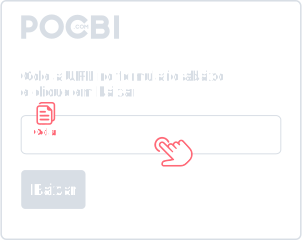
With the link copied, tap the paste icon next to the form at the top of the page and the site will automatically load the video information.
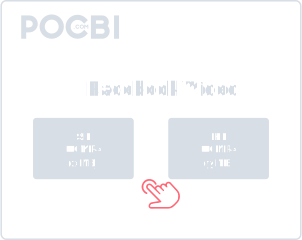
Now just choose the video quality you want to download and in a few seconds you will have the MP4 file saved in your phone gallery or in the Downloads folder on your device.
Pocbi is a complete free online tool for downloading social media videos using only the link. Inside the Facebook ecosystem, our platform lets you save videos and Reels directly to your device safely, without logins, passwords, app installation, or account creation.
Built with user experience in mind, Pocbi removes unnecessary friction to make your routine faster. One of its biggest advantages is the all-in-one approach, which helps you centralize downloads from multiple social networks in one place and save time.
You also get advanced features that improve the experience: support for multiple simultaneous downloads, an integrated player to watch and confirm the video before saving it, and a smart system that loads the media information automatically as soon as you paste the URL.
While browsing Facebook, we always come across a video that makes us smile, inspires us, or shows a recipe we do not want to lose. When we do not save it, finding it again can be almost impossible. Pocbi was built to help you save those videos so you can watch them later or share them with someone special.
Do not let great Facebook content disappear in your timeline. If you found a video that caught your attention, Pocbi is the ideal tool for downloading Facebook Reels in a simple, fast, and safe way.
Whether you are using your smartphone (iOS or Android) or your computer (Windows or Mac), Pocbi provides a smooth experience. The tool is 100% web-based, so there is no need to install apps or extensions that take up space.
Save your favorite Facebook videos and Reels while keeping the fidelity, sharpness, and clean look of the original file. Pocbi downloads the file exactly as the creator published it on the social network, with no logo, watermark, or extra visual layer added over the image.
Got carried away and want to save several videos at once? With Pocbi, you can. After requests from our community, we added simultaneous downloads. Just tap the + button and paste the links for the videos you want to save.
Our system loads the data instantly, letting you watch a preview and confirm that these are the right videos before downloading everything in a quick and simple way.
We built an integrated player so you can watch the full video content inside our own platform before the download even starts.
As soon as you paste the URL, our smart system loads the media on screen right away. This is perfect for making sure you are saving the correct Reel, Story, or video. It is a practical way to make sure the right file goes straight to your gallery.
Save your favorite Facebook videos and content from other social networks in one place. It is the complete solution you need to simplify your routine.
On the Facebook video you want to download, tap the Share icon and then Copy link. With the link copied, open your browser and go to pocbi.com. On the site, tap the paste icon on the right side of the form and the video information will load. Then just choose the video quality you want. After the download, open the file in your phone gallery or in the Downloads folder on your computer.
Yes, you can download videos on Android phones, iPhone, and also on desktop computers.
Yes. Pocbi lets you download more than one Facebook video at a time using multiple links in the same flow. This is useful if you want to save recipes, tutorials, lessons, Reels, or videos from pages without repeating the manual process for every file.
Yes, when the original video has audio available. In some cases, Facebook may separate audio and video or apply content restrictions, which can affect the final result.
In most cases, the video is saved as MP4, a format that works well on phones, computers, browsers, and messaging apps. Format availability may depend on the original file.
By default, the video is saved to the Downloads folder on both mobile and desktop. On mobile, you can also find it directly in your photo or video gallery.
The download may fail when the link is incorrect, the video was removed, there is a region block, an access restriction, or Facebook temporarily changes how it delivers the file. Check the link and try again.
Yes. After downloading the video to your phone, you can share it on WhatsApp as long as you respect the creator's rights and use the content in a permitted way.
Yes. Pocbi can be used for free to download Facebook videos by link, with no signup, no app installation, and no payment required to access the tool.
Yes, your safety is our priority. We follow strong web security practices to keep the platform clean and trustworthy. No video is hosted on our servers: the download happens directly and securely between your browser and Facebook's own servers. You do not need to sign up, log in, or provide access to your social network account. Pocbi does not store your IP address, download history, or personal data.
No. Pocbi does not ask for your login, password, or account access. To download public Facebook videos, just copy the post link and paste it into the tool.
No. Pocbi works directly in the browser, with no app, extension, or software installation. You only need to copy the video link, paste it into the tool, and choose the available download option.
No. Pocbi is not a video hosting platform and does not keep a public library of downloaded files. The tool only processes the link you provide and lets you save the file on your own device.
It depends on the content and how it will be used. Pocbi should be used to save your own videos, public videos, or content that is allowed for personal use, offline viewing, study, or reference. Do not redistribute, repost, edit, or monetize other people's videos without permission from the creator or rights holder.