
1. Copy the video link
Open the video on Pinterest that you want to save. Tap the Share icon below the video and choose Copy link.
Save Pinterest videos with no watermark
Found that recipe, home decor idea, or inspiring Pinterest video and want to save it to watch later without internet access? With Pocbi, you can download Pinterest videos with no watermark, in Full HD, straight to your phone or computer, without installing anything and completely free.
Open the video on Pinterest that you want to save. Tap the Share icon below the video and choose Copy link.
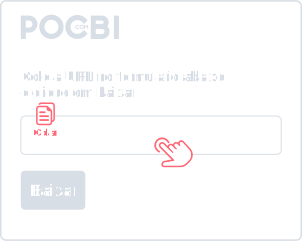
With the link copied, tap the paste button next to the form above and then tap Download. On desktop, right-click and choose Paste.
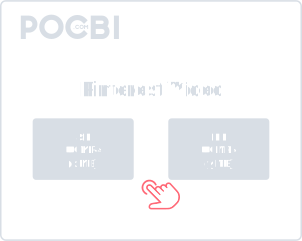
Choose whether you want to download the cover image or the Full HD video and the download starts in seconds.
Pocbi was designed to be a simple tool that makes daily life easier, letting you download multiple videos at once and even save complete Pinterest carousels, always with the best available quality.
Unlike other tools, you do not depend on any required installation, you do not need to create an account, and you do not have to share your social network login data. Just paste the link and download the video in seconds, straight to your phone or computer.
Whether you are on mobile (iPhone or Android) or on desktop (Windows or Mac), all you have to do is open your browser and visit Pocbi.com with convenience and security.
Because the tool is 100% web-based, there is no need to install an app or a browser extension. Just open the site and use it.
Download Pinterest videos with no watermark, no logos, and no modifications. You get the original file saved on your device.
Pocbi downloads videos in the original resolution. If the content is available in Full HD or 4K, it will be downloaded in the highest quality offered, directly, with no compression and no loss in image or audio quality.
Listening to user requests, we added the ability to download multiple videos at once. Now you can paste links for several videos at the same time and download them together in a simple, fast, and practical way.
Just click the plus button next to Download and keep adding the links for the videos you want.
We keep up with new social formats so you always have the most up-to-date tool. With Pocbi, you can download Pinterest carousel posts containing combined videos and images, as well as carousels with aggregated links from other social networks. Our system identifies and extracts all media from that post at once, allowing you to save each file individually at the highest resolution.
If you use Pinterest in the browser, you can download videos directly from the site. Install the Chrome extension and, whenever you are browsing Pinterest, a download button will appear. Just tap it and download the pin you want.
Chrome ExtensionKeep the best ideas from Pinterest and download videos from the main social networks on one platform. We built the ideal tool to make your daily routine easier.
To download Pinterest videos on Android, tap the Share icon below the video and choose Copy link. With the link copied, open your mobile browser, go to pocbi.com/pin, and tap the Paste button next to the search field. In seconds, the video information will load. Then just tap Download so the file is saved to the downloads folder and appears in your phone gallery.
To download Pinterest videos on iOS, copy the video link by tapping the Share icon below the post. With the link copied, open Safari and go to pocbi.com/pin. Tap the Paste button next to the form to load the video information. Then tap Download to save the file to the browser downloads folder, and you can move it to your gallery in a few taps.
On desktop, you can copy the video link from the browser address bar or by clicking Share and then Copy link inside Pinterest. Then go to pocbi.com/pin, right-click the text field, choose Paste, and click Download. The process works normally on Windows and Mac.
Yes, the video is downloaded like the original file, with no watermark added.
On Android and desktop, the video is usually saved in the Downloads folder and may also appear automatically in the gallery or file manager. On iPhone, when the download is done through Safari, the file is saved in the browser downloads folder, from where it can be moved to the iOS gallery.
Yes. All Pocbi features are 100% free, including Pinterest video downloads and downloads from other social networks. There is no download limit, no account creation is required, and there is no paid version to use the tool.
Videos are downloaded in MP4 format, which is compatible with almost all phones, tablets, and computers. The available quality always depends on the original video published on Pinterest. If it was uploaded in 1080p or 4K, for example, those options may appear for download in Pocbi.
No. Pocbi does not host videos, does not store copies of downloaded files, and does not collect the user's personal data. The download goes directly to your device, preserving your privacy throughout the process.
Yes, you can download Pinterest carousel posts made of videos or images, as well as any video content integrated into the platform. Our system is designed to read the link structure, identify the media, and release the full download in seconds.
Yes, as long as it is for strictly personal use, educational purposes, or offline reference material. However, you should not sell, distribute, edit, or repost other people's videos and images as if they were your own, or use them in commercial projects without the creator's prior permission.